ARDUINO PROJECTS
Arduino Realtime LPG Leakage Detection System
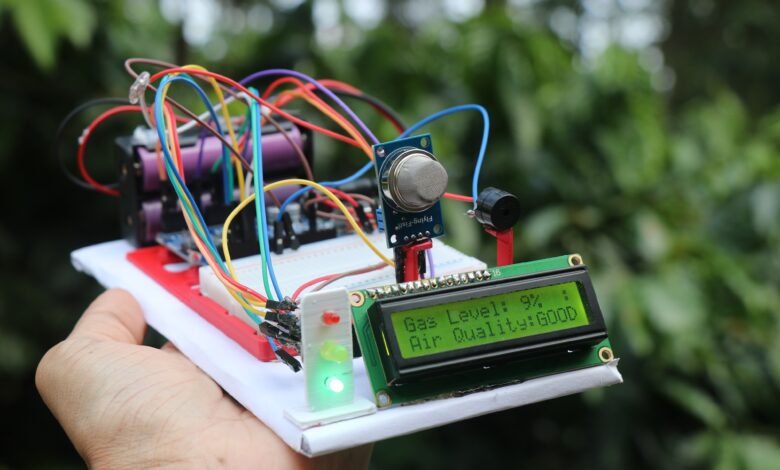
Arduino RealTime LPG Leakage Detection project with full project report and step by step Instructions
Complete video of this project is here
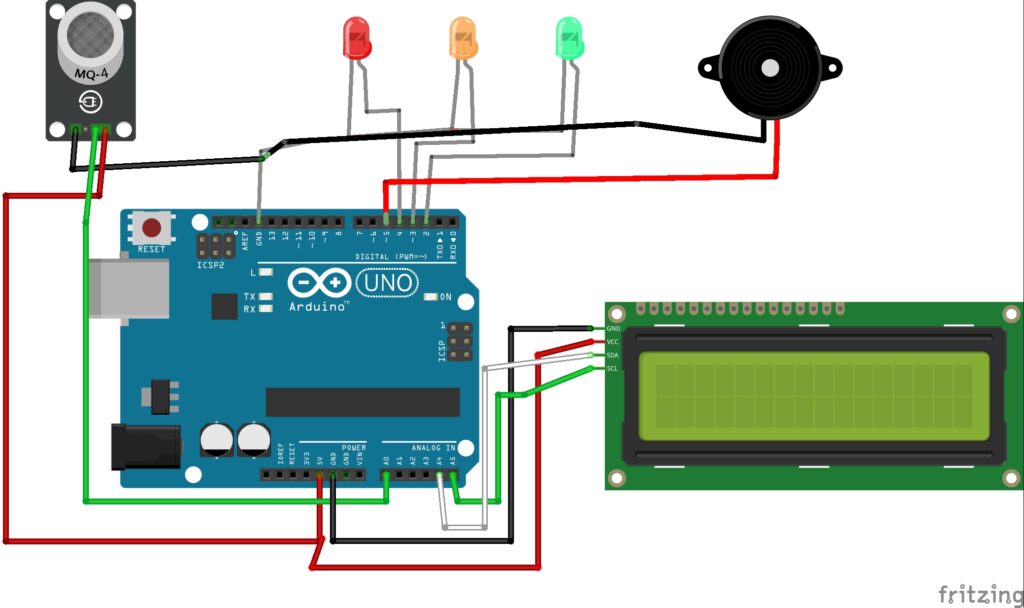
Arduino LPG Leakage Detection Project Circuit Diagram
Arduino LPG Leakage Detection Project Code
#include <Wire.h>
#include <LiquidCrystal_I2C.h>

LiquidCrystal_I2C lcd(0x27, 16, 2);  // I2C address (change if needed)

int gasSensor = A0;
int greenLED = 2;
int yellowLED = 3;
int redLED = 4;
int buzzer = 5;

int threshold1 = 250;  // 50% (Moderate gas)
int threshold2 = 400;  // 100% (Dangerous gas)

void setup() {
  pinMode(greenLED, OUTPUT);
  pinMode(yellowLED, OUTPUT);
  pinMode(redLED, OUTPUT);
  pinMode(buzzer, OUTPUT);
  pinMode(gasSensor, INPUT);

  lcd.init();
  lcd.backlight();

  lcd.setCursor(2, 0);
  lcd.print("GAS MONITOR");
  delay(1000);
  lcd.setCursor(0, 1);
  lcd.print("Initializing...");
  delay(2000);
  lcd.clear();
}

void loop() {
  int gasValue = analogRead(gasSensor);
  Serial.print("Gas Value: ");
  Serial.println(gasValue);

  lcd.setCursor(0, 0);
  lcd.print("Gas Level: ");
  lcd.print(map(gasValue, 0, 1023, 0, 100)); // display percentage
  lcd.print("%   "); // clear trailing chars

  if (gasValue < threshold1) {
    // Safe level
    digitalWrite(greenLED, HIGH);
    digitalWrite(yellowLED, LOW);
    digitalWrite(redLED, LOW);
    digitalWrite(buzzer, LOW);

    lcd.setCursor(0, 1);
    lcd.print("Air Quality:GOOD ");
    lcd.setCursor(14, 0);
    lcd.print(" :)");  // a small smile emoji style
  }
  else if (gasValue >= threshold1 && gasValue < threshold2) {
    // Moderate level
    digitalWrite(greenLED, LOW);
    digitalWrite(yellowLED, HIGH);
    digitalWrite(redLED, LOW);
    digitalWrite(buzzer, LOW);

    lcd.setCursor(0, 1);
    lcd.print("Air Quality:WARN ");
    lcd.setCursor(14, 0);
    lcd.print(" :|");
  }
  else if (gasValue >= threshold2) {
    // Dangerous level
    digitalWrite(greenLED, LOW);
    digitalWrite(yellowLED, LOW);
    digitalWrite(redLED, HIGH);

    tone(buzzer, 1000);
    delay(500);
    noTone(buzzer);

    lcd.setCursor(0, 1);
    lcd.print("!! ALERT !!");
    lcd.setCursor(14, 0);
    lcd.print("!!!");
  }

  delay(300);
}